
General and screen statistics: why the numbers may differ
Identify the set used by each indicator before comparing daily counts, proportions, and sample measurements.
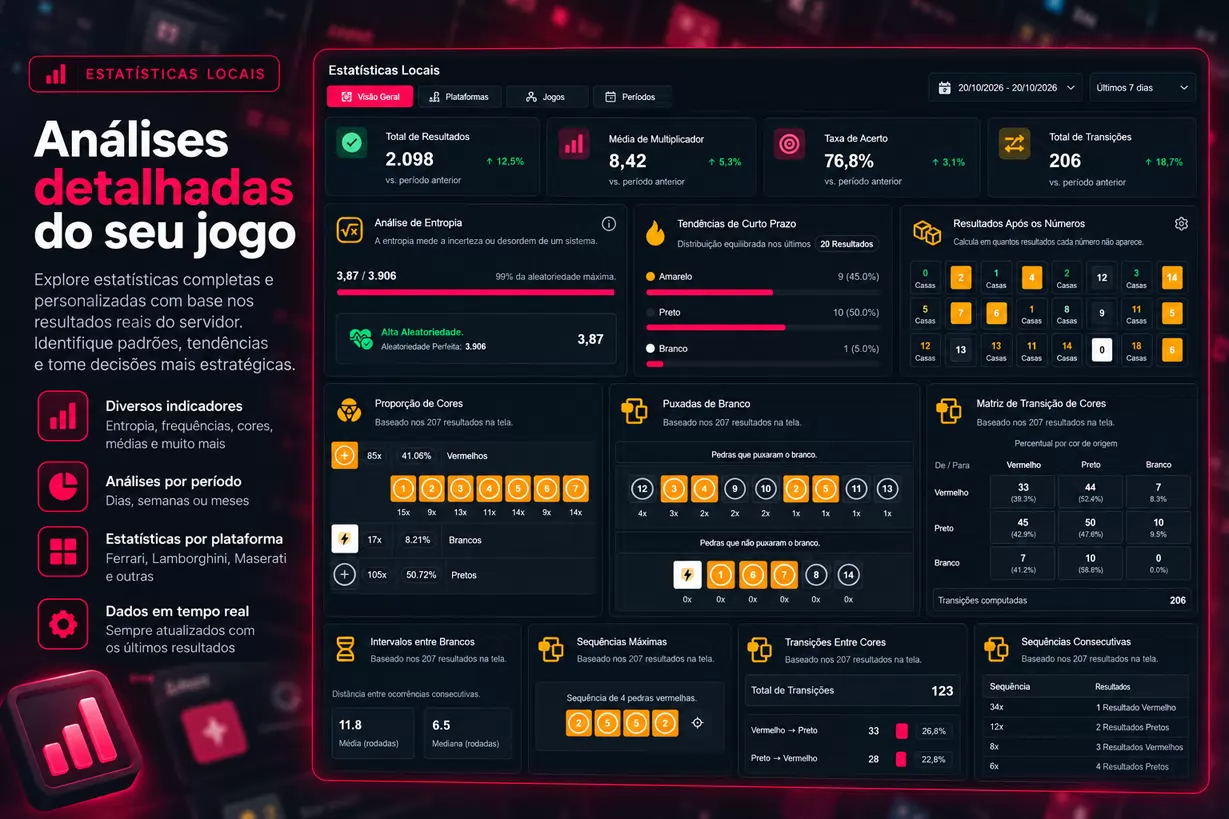
📊 General Statistics vs. Screen Statistics: why the numbers might differ
Have you ever opened Históricos Blaze, checked the General Statistics, and then noticed that the numbers shown in the Screen Statistics were different? 🤔
If this happened, know that this difference can be completely normal!
Históricos Blaze offers different tools to track and interpret game results. Among them are two very important sets of indicators:
- 🌐 General Statistics: present information consulted for a specific platform and game.
- 🖥️ Screen Statistics: allow analysis of different indicators related to the results available on the interface.
Although both work with game data, they do not always use the same records, periods, or criteria.
In this article, we will explain these differences, present examples, and show how to correctly interpret the indicators.
🔍 The secret lies in the dataset analyzed
Before interpreting any statistic, there is a fundamental question:
Which results were used in this calculation?
This question is essential because a statistic represents a specific set of information.
Imagine two analyses:
- The first uses all the results available from a particular day.
- The second considers only the last 200 results loaded in the grid.
Even analyzing the same game, the numbers can be different.
This happens because the two analyses work with different samples.
📌 Important rule: before comparing two indicators, check if they represent the same period and the same quantity of results.
🌐 What are General Statistics?
General Statistics present information consulted for the selected platform and game.
They help track indicators such as daily counts and the latest available occurrences.
Depending on the mode, you may find information related to:
- 📅 Number of results today.
- 🗓️ Indicators referring to the previous day.
- ⏰ Occurrences at specific times.
- 🎯 Latest specific results.
- 📊 Counts and other available indicators for the game.
⚠️ Not all indicators represent the same period
This is a very important detail.
When a panel presents information like Today, Yesterday, Current hour, or Latest, each expression may represent a different time slice.
| Indicator | What to observe |
|---|---|
| 📅 Today | Results considered for the current day |
| 🗓️ Yesterday | Information referring to the previous day |
| ⏰ Current hour | Slice associated with a specific time or interval |
| 🎯 Latest | Most recent occurrence available for the criterion |
| 📊 Total | Quantity corresponding to the period defined by the indicator |
Therefore, it is not correct to assume that all numbers in the same section were calculated using exactly the same records.
Each indicator should be interpreted according to its description and reference period.
🖥️ What are Screen Statistics?
Screen Statistics offer different ways to analyze the results available on the interface.
Many of these indicators use the records loaded in the results grid.
This means the dataset analyzed can change as you interact with the page.
For example:
- 🔄 When loading more results.
- 🔍 When applying filters.
- 📅 When selecting specific periods.
- 🎨 When filtering certain colors.
- ⏰ When limiting the times of rounds.
🧮 Example: analyzing 200 results
Imagine your grid is displaying 200 results of a Double game.
In this set, you find:
| Color | Occurrences | Percentage |
|---|---|---|
| 🟠 Yellow | 90 | 45% |
| ⚫ Black | 95 | 47.5% |
| ⚪ White | 15 | 7.5% |
| Total | 200 | 100% |
These percentages represent exclusively the 200 records used in the example.
Now imagine you apply a time filter and start seeing only 50 results.
The distribution may change significantly.
This does not mean the previous data was incorrect. It just means the dataset analyzed changed.
💡 The numbers in this table are illustrative and do not represent real platform statistics.
⚠️ Attention: not all screen panels depend exclusively on the grid
Although many indicators use the loaded results, there are exceptions.
Some panels, such as certain groupings by hour, may perform specific day queries.
Therefore, not always an indicator located in Screen Statistics uses exactly the same records shown in the grid.
Before comparing the numbers:
- Read the indicator description.
- Check the available controls.
- Verify the selected period.
- Identify if the information depends on the grid or a specific query.
This check avoids misinterpretations.
📊 Practical example: 2,000 results versus 200 results
Let's imagine a very common situation.
You open General Statistics and find:
📅 Results of the day: 2,000
Then, you check Screen Statistics and notice your grid contains:
🖥️ Loaded results: 200
Is there an error?
Not necessarily!
General Statistics may be considering a daily set of 2,000 records, while the grid analysis uses only 200.
See a hypothetical example:
| Information | General Statistics | Screen Statistics |
|---|---|---|
| Results considered | 2,000 | 200 |
| Occurrences of one color | 960 | 110 |
| Percentage of this color | 48% | 55% |
Although the percentages are different, both can be mathematically correct.
The difference happens because the datasets are not the same.
🧠 What can we learn?
A smaller sample may show a different distribution from that observed in a larger set.
Moreover, a higher total can simply represent a longer time interval.
Comparing percentages without identifying the quantity and period of records can lead to incorrect conclusions.
🎛️ How do filters influence statistics?
Filters are important features of Históricos Blaze because they allow selecting results according to specific criteria.
Among the possibilities are:
- 📅 Start and end dates.
- ⏰ Start and end times.
- 🎨 Color.
- 🔢 Number.
- ⚖️ Parity.
- 🕒 Hour and minute.
- 📊 Number of results.
Imagine you want to study only results recorded between 10 am and 11 am.
By applying this filter, the grid may show a smaller set of records.
Indicators depending on this grid may reflect this new selection.
🔎 Why is this useful?
Because it allows studying specific behaviors without necessarily mixing all available results.
However, there is a fundamental caution:
A distribution observed at a particular time does not guarantee the same behavior will happen again.
Filters help organize historical analyses, not predict future results.
📈 Frequencies, sequences, and transitions: how to interpret?
Screen Statistics can present different types of analyses.
🎨 Color proportion
Shows how certain colors are distributed in the considered set.
It is useful to identify the composition of the sample but does not determine which color will come next.
🔥 Short-term trends
Provide information about recent results within the analyzed slice.
A recent sequence does not mean it will continue or necessarily be interrupted.
🔄 Transition matrix
Allows observing how many times a certain result was followed by another within the sample.
For example, you can check how many times a red round was followed by a black round.
This describes the observed history but does not establish a rule for the next round.
🧮 Entropy analysis
Entropy is a statistical measure related to uncertainty or distribution of results.
It helps to characterize the analyzed sample.
An entropy value alone does not allow predicting the next round.
⏳ Intervals and sequences
These indicators help study distances between occurrences and registered sequences.
They are interesting tools for historical analyses when interpreted within the dataset used.
🔮 What about projections? Do they represent future results?
Some indicators in Históricos Blaze may present projections calculated from available data.
But there is an important difference between observed count and statistical projection.
- ✅ Observed count: represents occurrences effectively recorded in the analyzed slice.
- 📐 Projection: represents an extrapolation or estimate calculated from the available information.
For example, if a particular indicator presents a projection of occurrences for the day, it does not mean that amount has already happened.
Nor does it mean it will necessarily happen.
Projections are estimates, not guaranteed results.
📝 Checklist: how to compare statistics correctly?
Before concluding that two indicators diverge, check the following points:
- Platform: do the indicators belong to the same platform?
- Game: do both analyze the same mode?
- Quantity: how many results were considered?
- Period: do the information represent the same time interval?
- Filters: is there any active filter on the grid?
- Updates: did new results arrive during the comparison?
- Data source: do the indicators use the grid or specific queries?
- Type of indicator: are you comparing observed counts or projections?
These checks help identify legitimate differences and possible inconsistencies.
🧪 How to perform more consistent analyses?
A good practice is to work with well-defined result sets.
In Históricos Blaze, you can use tools like interval selection, comparison, and export to organize your studies.
1. Define the analysis objective
For example: study color distribution in a specific interval.
2. Select the results
Use filters or interval selection to define which records will be considered.
3. Record the conditions
Note platform, game, period, quantity, and filters used.
4. Work with a stable sample
If the page is receiving updates, the displayed results may change.
To preserve a specific segment, use available selection, comparison, or export features.
5. Compare equivalent sets
Whenever possible, use the same period and criteria to compare indicators.
This way, your conclusions will be better contextualized.
❓ Frequently asked questions
Should General and Screen Statistics show the same numbers?
Not necessarily. They may use different periods, quantities, and queries.
If I load more results, do the statistics change?
Indicators calculated on the grid may change when new records are loaded.
Does applying filters alter all statistics?
No. The effect depends on the data source of each indicator. Some panels use specific queries regardless of the set shown in the grid.
Does a projection represent a guaranteed result?
No. Projections are estimates and do not guarantee future occurrences.
How do I know if I found an error?
First, check the criteria of each indicator. If the numbers remain inconsistent after verifying their scopes, record the platform, game, times, and filters used and send the example to support.
🚀 Explore Históricos Blaze statistics!
Históricos Blaze gathers tools to transform historical records into organized and accessible information.
With General Statistics, you track indicators consulted for each platform and game.
With Screen Statistics, you explore different analyses related to the available result sets.
The most important thing is to understand the context of each number.
📊 Different statistics do not necessarily mean incorrect data. Often, they just mean different slices.
Want to get to know these tools better?
Explore the indicators, use the filters, and develop increasingly organized analyses!
⚠️ Important notice: statistics presented by Históricos Blaze describe historical results and available datasets. Frequencies, sequences, trends, and projections do not guarantee future results nor eliminate risks associated with gambling.
