Tools
Double bankroll manager
Simulate stakes, white protection, targets, and stop loss with a virtual bankroll saved in this browser.
How to use it, step by step
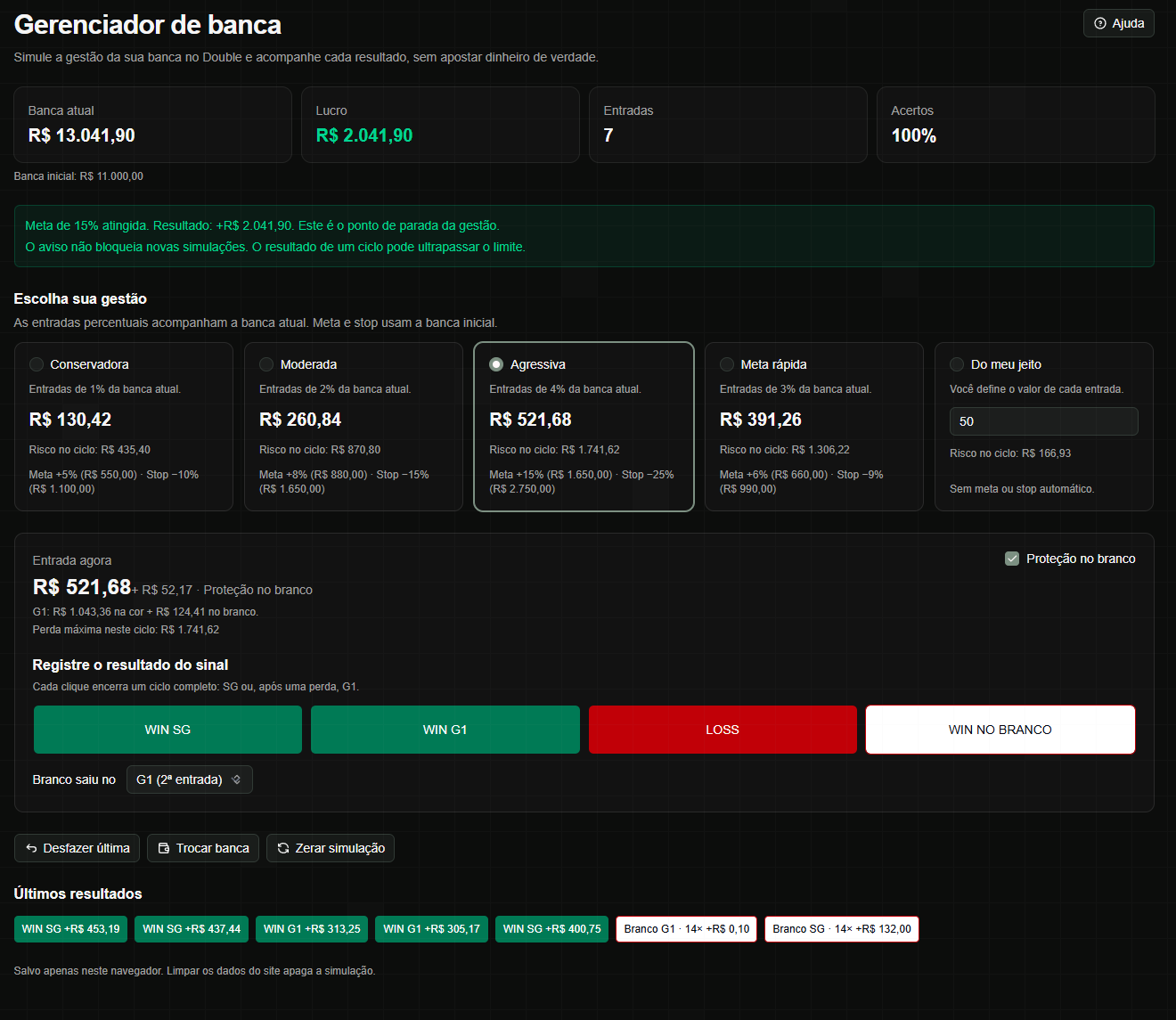
- Open Bankroll Manager in the sidebar and enter a virtual starting bankroll from R$ 0.01 to R$ 1,000,000.00, with up to two decimal places and no thousands separator. Click Start simulation.
- Choose a strategy. Stakes follow the current bankroll: Conservative uses 1%, Moderate 2%, Aggressive 4%, and Quick target 3%. Targets and stops use the initial bankroll: 5%/10%, 8%/15%, 15%/25%, and 6%/9%, respectively.
- Under My way, set a fixed stake and your target and stop loss percentages, from 0 to 100 with up to two decimal places. Set either limit to 0% to disable it independently.
- Check the current stake and cycle risk. SG is the first stake; after a loss, G1 doubles the color stake. Color pays 2× and white pays 14×, including the stake. Net profit subtracts all stakes and protection used.
- Enable white protection to simulate it. SG uses 10% of the stake, with a minimum of R$ 0.01. G1 protection is calculated to cover cycle spending if white occurs; review the displayed amounts before recording.
- Manually record WIN SG, WIN G1, or LOSS. For WIN ON WHITE, first choose whether white occurred at SG or G1. Each click closes a full cycle; LOSS deducts both stakes and protections. Recording is unavailable without enough balance for the full cycle risk.
- Follow the current bankroll, profit or loss, entries, win rate, and recent results. Targets and stops show notices without blocking further simulation; a cycle can exceed a limit. These strategies are simulation examples and do not guarantee profit.
- Use Undo last to remove the latest cycle. Reset simulation asks for confirmation, clears history, and restores the initial bankroll while keeping settings. Change bankroll asks for confirmation, deletes the current session, and lets you start with another balance.
Good to know
You enter the outcomes yourself: the tool does not follow live rounds or place bets. The simulation stays in this browser, does not sync with your account, and can be lost when site data is cleared.