
Sidebar widgets and forecasts in slots: two different features
Check the latest occurrences in the widgets and understand how the personal tags of the Fixed Column differ from the replay.
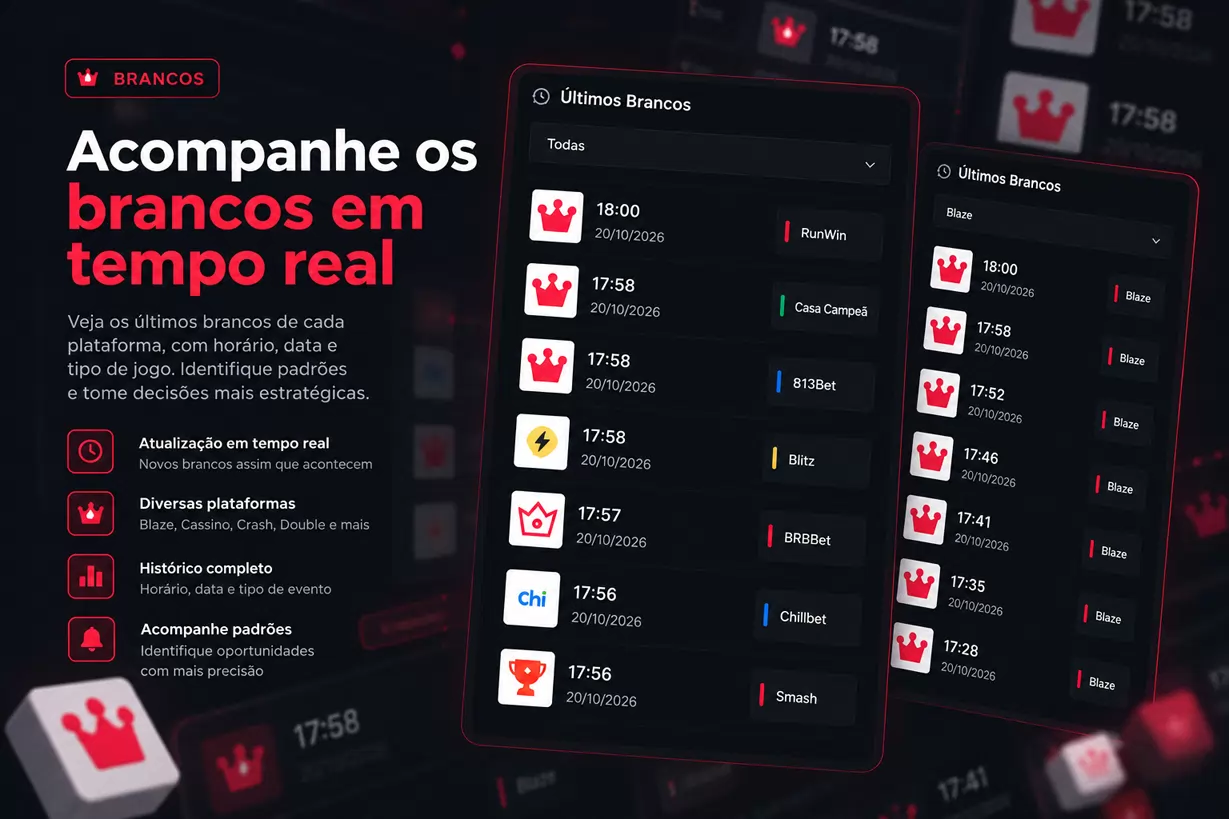
🎯 Side Widgets and Predictions: Discover Two Tools of Históricos Blaze
Did you know that Históricos Blaze offers features to track recent occurrences and also record your own predictions directly on the results grid? 🔥
These features help organize information and follow personal choices during game analysis.
We are talking about the Side Widgets and Predictions in the Fixed Column Slots.
Although they appear near the results area, these tools serve quite different purposes.
- 📊 Side Widgets: consult occurrences and sequences already registered on the platforms.
- 🎯 Predictions in Slots: allow marking personal choices in specific positions of the Fixed Column.
In this article, you will learn how to use each feature, interpret their information, and avoid confusion between predictions, histories, and reports.
📊 What are the Side Widgets?
Side Widgets are panels available on the right sidebar of Históricos Blaze.
They organize information about certain game occurrences, making it easy to consult without having to manually search each result.
Among the available features are:
- ⚪ Last whites.
- 🐼 Last pandas.
- 🔄 Occurrence sequences.
- 🕒 Result times.
- 🎮 Platform identification.
The widgets consult registered information and display data according to the selected mode.
🔎 How to access?
1. Log in to your account
Features are available based on functionalities enabled in the authenticated session.
2. Locate the right sidebar
In the results area, look for groups of available widgets.
3. Choose the mode
Use tabs or selectors to consult the desired records.
4. Check the details
Note the time, date, and platform associated with each occurrence.
This is important because the widgets may gather information from different platforms.
⚪ Last whites: follow recent occurrences
The Last Whites widget allows consulting recent records of this occurrence in available modes.
Instead of navigating through multiple grids, you find information organized in a list.
📋 Illustrative example
| Platform | Time | Occurrence |
|---|---|---|
| Blitz | 14:32 | ⚪ White |
| RunWin | 14:29 | ⚪ White |
| Casa Campeã | 14:25 | ⚪ White |
| Smash | 14:21 | ⚪ White |
The times shown are fictional and serve only to demonstrate the organization of information.
💡 What to observe?
- The platform where the result occurred.
- The recorded date and time.
- The order of the occurrences presented.
- The mode selected in the widget.
Attention: a list of recent occurrences does not necessarily represent all rounds loaded in your current grid.
It may gather records consulted separately and originating from different platforms.
🐼 Last pandas and sequences
Besides whites, widgets can display occurrences related to pandas, according to the available modes.
You can also find sequence consultations.
A sequence represents a set of consecutive occurrences that meet a specific criterion.
🔄 Sequence example
Imagine a panel showing two consecutive special results:
| Round | Result |
|---|---|
| 15:10 | 🐼 Panda |
| 15:11 | 🐼 Panda |
In this hypothetical example, we have a sequence of two occurrences.
Widgets help locate such records without requiring you to manually scroll through the entire history.
⚠️ Sequences do not guarantee repetitions
Finding two or more consecutive occurrences does not mean another will happen next.
Likewise, a long gap without a certain result does not mean it is about to appear.
Widgets describe the registered history. They do not function as automatic prediction systems.
⏱️ Does the time since the last occurrence indicate when the next will come?
This is an important question.
Imagine a widget reporting the last white occurrence was 35 minutes ago.
Does this mean the next white will occur soon?
No.
The presented interval only describes the time elapsed since the recorded occurrence.
It does not represent a countdown nor a reliable estimate of the next round.
Even when a history shows similar intervals, this does not establish a rule for future results.
📌 Remember: elapsed time is historical information, not a prediction.
🎯 What are Predictions in Slots?
Now let's explore a different tool: Predictions in the Fixed Column Slots.
This feature allows you to record personal choices directly in specific positions of the grid.
Instead of just observing previous results, you can mark an available option for the game and track the counters presented by the system.
🧩 How does it work?
In the Fixed Column view, there are positions designated for results.
When a slot is empty, you can click it to select one of the options available for that mode.
The marking stays associated with the panel’s position used.
Important: these choices are made by the user.
Históricos Blaze does not automatically create these markings as betting recommendations.
🖥️ How to register a prediction on the Fixed Column?
The process is simple:
1. Activate the Fixed Column
In the results area, select the corresponding view mode.
2. Locate an empty slot
Find a position available to register your choice.
3. Click the slot
The system will present permitted options for the selected game.
4. Choose an option
Register the desired marking.
5. Check the predictions control
Use the predictions panel to track markings and available counters.
Options may vary depending on the mode, as well as the rules used to evaluate the markings.
📈 How do the prediction counters work?
The predictions control allows consulting information related to the markings made.
Depending on the game, the system presents counters linked to the evaluation of these choices.
However, there is one fundamental detail:
Evaluation rules vary according to the mode.
This means counters should not be interpreted as a generic mechanism able to assess any arbitrary text, number, or result.
Each game has its own options and criteria.
🧮 Illustrative example
Imagine you have registered choices in certain slots.
After tracking the corresponding results, the control displays a report of the evaluations performed.
This report can help review your markings but does not demonstrate that similar choices will perform the same in the future.
The goal is to register and track personal decisions within the tool’s rules.
🧹 Clear predictions or clear report: what is the difference?
This distinction is very important!
The control provides different actions to manage markings and previous records.
| Action | Purpose |
|---|---|
| 🧹 Clear predictions | Remove pending markings |
| 🗑️ Clear report | Reset previous counters |
These operations are not the same thing.
Practical example
Imagine you have made several markings and want to start a new selection.
If the goal is to remove predictions still pending, use the clear predictions action.
On the other hand, if you wish to reset the previous counters, use the specific clear report option.
Before performing any clearing, check which information you want to keep.
💾 Where are predictions stored?
Slot predictions use their own storage in the browser.
This storage is separated by platform and game.
This allows organizing markings according to the mode used.
However, there is an important difference between this feature and tools from the analysis lab.
Predictions registered in the Fixed Column do not automatically share the same report used by Replay.
Therefore, records from the two features should not be considered a single test history.
🔍 Which tool to use in each situation?
The choice depends on what you want to analyze.
📊 I want to consult recent occurrences
Use the Side Widgets.
They help locate last whites, pandas, and available sequences.
🎯 I want to register a choice in a grid position
Use Predictions in the Fixed Column Slots.
This feature allows tracking your personal markings within the game options.
🧪 I want to test a hypothesis in a controlled sequence
Explore Replay.
It allows registering choices before results are revealed.
📁 I want to document and export an analysis
Consider Replay or Separate Test features, according to the options available for your type of test.
⚠️ Common mistakes when using these tools
To correctly interpret the information, avoid some pitfalls:
❌ Confusing history with prediction
A recent occurrence does not determine the next result.
❌ Comparing records from different platforms without checking the origin
Widgets may gather information from multiple platforms. Always check the identification of each item.
❌ Interpreting elapsed time as a countdown
The interval since the last occurrence does not indicate when the next will happen.
❌ Considering personal markings as automatic recommendations
Predictions in the slots are choices registered by the user.
❌ Mixing reports from different tools
Slot counters and Replay records have separate storage and rules.
❌ Clearing information without checking the action
Removing pending predictions is not the same as resetting the previous report.
🚀 Explore Históricos Blaze Widgets and Predictions!
Históricos Blaze gathers different tools to help you consult results, organize information, and document your own analyses.
With Side Widgets, you follow occurrences and sequences registered in available modes.
With Predictions in Slots, you can record personal choices directly in the Fixed Column and consult corresponding counters.
And for more structured analyses, there are tools like Replay and Separate Test.
🔥 Access Históricos Blaze and explore the tools
Discover the features, understand their differences, and enjoy a more organized analysis experience!
⚠️ Important notice: widgets present historical information, while slot predictions record personal choices. None of these tools guarantee future results, eliminate game randomness, or represent betting recommendations.
