
History Filters: selecting your sample on Históricos Blaze
Learn how to use history filters to set date, time and game-specific criteria, check the returned count and understand common limitations when filtering results.
What the filters do
History filters let you choose which results are included in your analysis by date, time and game-specific attributes. They help narrow the sample before using other visualization or validation tools. ⚙️
Where to find them
Open the results page and go to the "Filters" tab in the game interface.
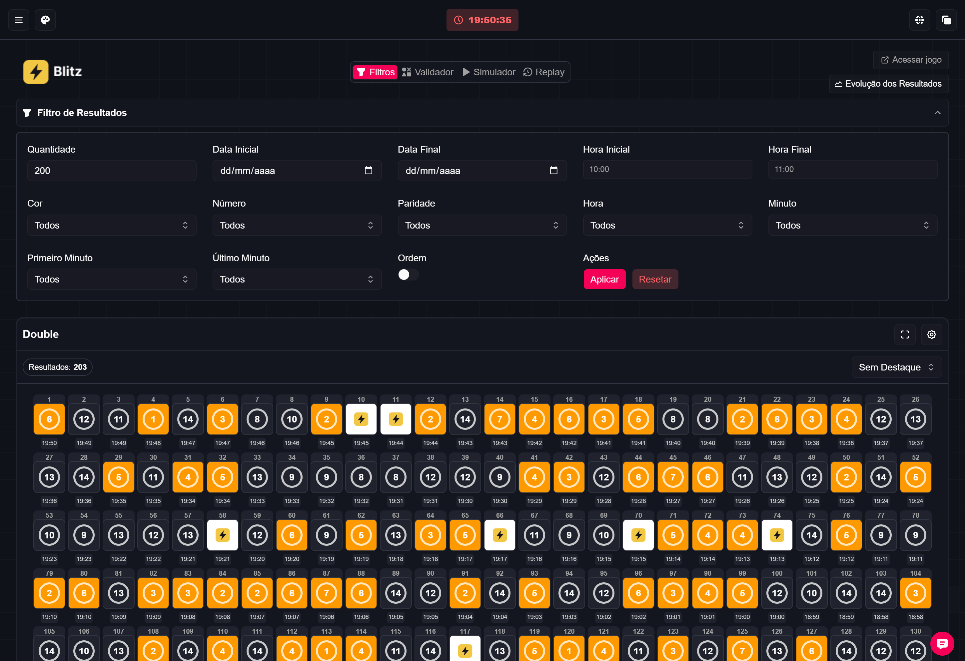
Visible controls (reference image)
The illustrative screenshot shows common fields and buttons in the filters tab. Examples of controls you may encounter:

- Quantity (number of results to return)
- Start Date / End Date
- Start Time / End Time
- Color, Number, Parity
- Hour, Minute, First Minute, Last Minute
- Order (normal or reversed)
- Buttons: Apply and Reset
- Indicator showing the number of results returned
Numbers and results shown in the image are illustrative only and are not current statistics or proof of gains. 📸
Step by step (reference guide)
- Open the Filters tab and set the period (dates and times) or the criteria available for the game you are analyzing.
- Select the specific attributes presented for that game (see section below). Use "Apply" to fetch the corresponding sample and check the displayed count.
- Use "Reset" to return to an unfiltered query; if you need a larger sample, increase the quantity or widen the period.
Criteria by game type (use only the criteria shown in the game)
- Roulette-style games: number, color, parity, and multiplier limits.
- Ice Fishing: result type, sector, and multiplier limits.
- Wheel: color and cell (0–53).
- Crazy Time: wheel result and multiplier are separate from Top Slot fields.
Use only the criteria actually presented for the game — the interface varies by platform.
Limitations and filtering cautions
- Filtering by color or number can remove intermediate rounds from view. A sequence in the filtered sample is not necessarily a continuous sequence in the original game; there may be gaps between rounds. ⚠️
- Very restrictive filters (e.g., number plus multiplier limits) reduce the sample and can make patterns less representative.
- Always check the returned result count before interpreting patterns.
Best practices
- Start with broad filters (date and time) and refine gradually.
- Use "Reset" when you want to compare the filtered sample to the full history.
- If the sample becomes small, widen the period or remove less relevant criteria.
Important notices
- Treat Blaze and Blitz as different platforms; filter options can vary between them.
- Do not recommend betting to minors. 🚫
- Do not make regulatory claims or statements about platform status without official sources.
Fictitious example
Imagine you need to analyze results from 10:00 to 11:00: set Start Time and End Time, keep Color as "All" and apply. This is a fictitious illustration to show the usage flow.