
Floating Column
Arrange history in an adjustable grid: set columns, empty slots, panel height and zoom to examine results with flexibility.
What is the Floating Column
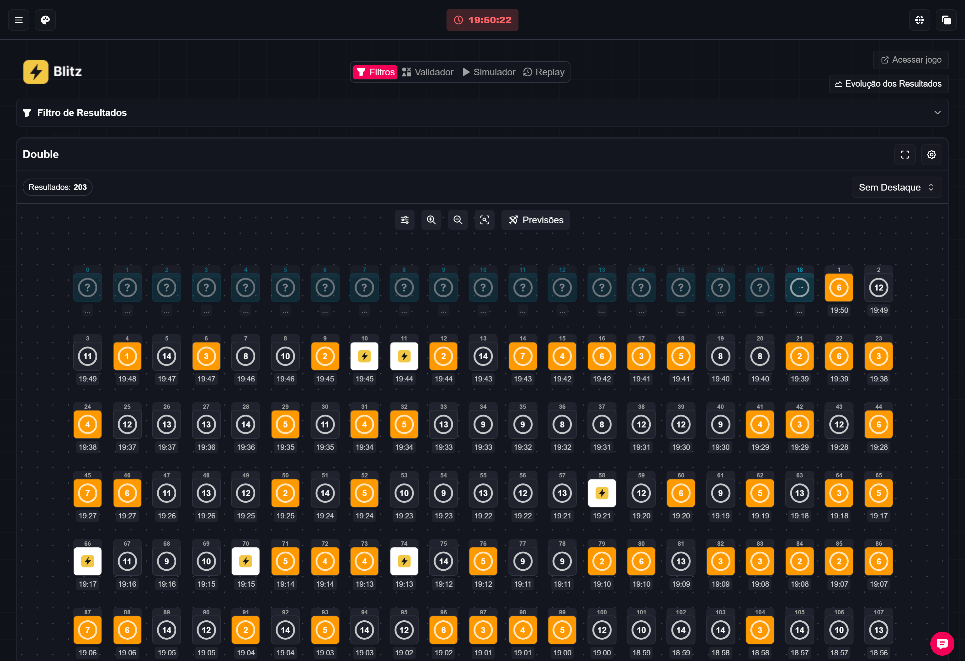
The Floating Column is a history visualization mode that arranges results in a flexible grid. It lets you set the number of columns, add empty slots, control the panel height and use zoom to explore the history in a non-linear layout.
Note: according to the owner, Blaze is paused in Brazil. This article does not state any regulatory status nor does it recommend betting to minors. Numbers and results shown in images are illustrative captures, not current statistics or guarantees of winnings. 🎯
Where to find it
Gear (results) → Results visualization → Floating Column.
Step-by-step (reference guide)
- Log in and select Floating Column in the results gear. This mode corresponds to what was previously called Fixed Column; previous settings are preserved.
- Open the panel settings to set the number of columns and the empty slots. Confirm each change by clicking Update.
- Adjust the panel height by dragging the area. Use the zoom controls and the restore button to navigate the history at different detail levels.
- Check the row and column metrics to compare the number of loaded results. The displayed distribution depends on the organization you choose.
Notes by game
- Ice Fishing: fish, leaves and multipliers shown follow the layout and zoom level. Spaces are neutral: there are not yet predictions or row/column metrics for this game.
- Wheel: does not offer Floating Column.
Visible controls and elements (reference image)
The reference image shows readable labels and controls including: "Filters", "Validator", "Simulator", "Replay", a button labeled "Evolução dos Resultados" (Results evolution) and zoom/restore icons. There is also a button labeled "Previsões" (Predictions). Numbers and results visible in the screenshot are illustrative.

When to use Floating Column
- To visually organize history without strict chronological alignment.
- When you want to intentionally use empty slots in the grid to compare visual patterns.
Tip: to position rounds by time and check minute-by-minute gaps, use Fixed Column in compatible games. 🧭
Games listed as compatible (reference)
double, double-max, double-vip, double-7k, fortune-double, crash, crash-2, crash-neymar, slide, aviator, aviator-2, aviator-studio, spaceman, car-roulette, crazytime, crazytime-a, ice-fishing, lightning-roulette, xxxtreme-lightning-roulette, gold-vault-roulette, auto-roulette, immersive-roulette, red-door-roulette, fireball-roulette, monopoly-roulette, vip-roulette, fortune-roulette, mega-roulette, mega-roulette-3000, gates-of-olympus-roulette, crystal-roulette, powerup-roulette.
Limitations and warnings
- Do not assume features beyond what is described in this guide.
- Some games lack integrated predictions or row/column metrics; see the notes above.
- Examples shown in images are fictitious and for illustration only.
If you want, I can expand the checklist into a quick reference card for each control. ✅