
Histories Blaze Viewing and querying
Fixed Column
Practical guide to the Fixed Column: view results by minute, set interval splits and manage saved predictions in the results interface.
4 min read
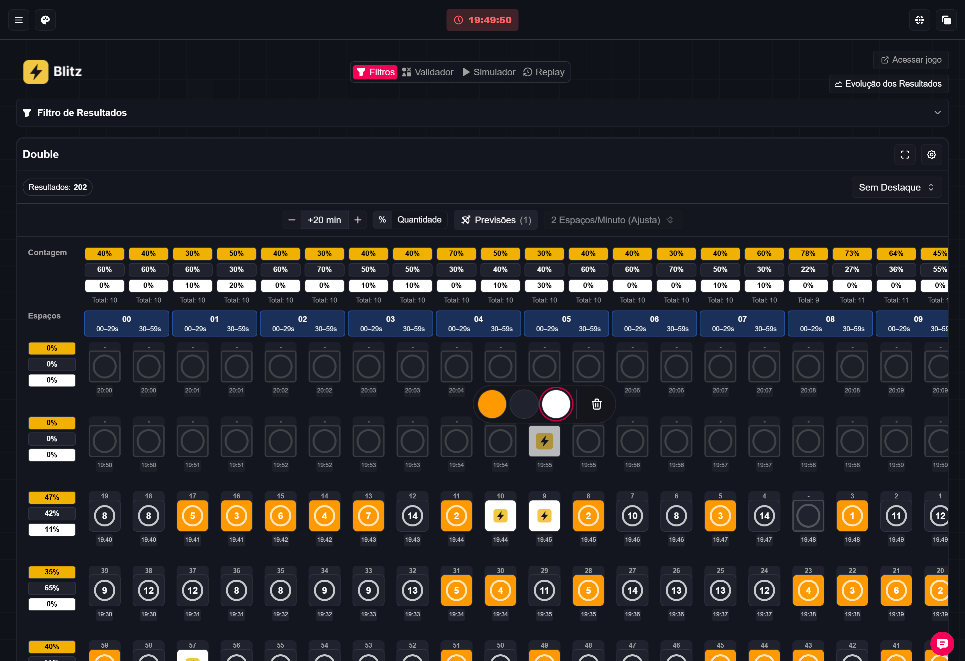
What the Fixed Column shows
The Fixed Column displays results grouped by minute, showing how events fall into regular intervals using Brasília time. It’s a visualization for checking temporal patterns in supported games (for example: Double, Fortune Double, Car Roulette, Slide and live roulettes). ⚡️
Where to find it
Results → Settings → Results view → Fixed Column
Advertisement

Reading the grid
- Groups 00–09 represent the minute’s last digit; each row covers ten-minute blocks.
- The grid columns represent minute subdivisions ("spaces"). Each slot may contain a result or be empty if no round occurred in that sample interval.
- Counts (above the columns) show percentages or quantities calculated from the loaded results; empty slots are excluded from these calculations.
Note: numbers and results shown in the reference image are illustrative and do not represent current data or guarantees of outcomes.
Configuring spaces (minute subdivisions)
- In Double, Fortune Double and Car Roulette, Automatic can detect up to three spaces per minute, with a minimum of two in those games.
- Slide uses five 12-second intervals; live roulettes have at least one space per minute.
- Use the spaces selector to pick an available division for the loaded sample. Filters or loading more results may change these divisions.
Adding/removing rows and preferences
- Use − and + to remove or add ten-minute rows above the grid; you can extend the display up to 24 additional hours.
- Row preferences are saved in the browser.
- In settings you can show/hide “Column Count” and “Row Count” independently. “Large Results” adjusts slot sizes.
Mobile vs Desktop behavior
- On mobile, explicitly selecting 2 spaces per minute compacts groups 00–09 to fit the screen and hides the row count sidebar; other divisions keep horizontal scrolling.
- On desktop the grid preserves larger sizes and may require horizontal/vertical scrolling.
Predictions in the Fixed Column (where available)
- For Double, Fortune Double and Car Roulette, with real-time active or filters applied, you can click an empty slot in the current minute (or a future slot whose interval hasn't ended) and choose a color or car from the menu. Roulettes and Slide do not offer predictions in the Fixed Column.
- Predictions are saved in this browser per platform, game and schedule, separate from the Floating Column. While pending predictions exist, the spaces selector is locked to preserve intervals.
- The predictions control lets you view and clear choices and counters; after removing pending items the division can be changed.
- The first available round in the interval settles the choice once; intervals without a round remain pending. Automatic settlement does not use the filtered sample.
Important: predictions work only while the interval is open; you can change or remove a choice until the interval ends.
Counts and gaps
- Displayed counts (percentage or quantity) use only the loaded and filtered results by color or car; empty slots are excluded from percentages.
- Gaps and percentages describe the current loaded sample; applying filters or loading more results can change them.
+N button and simultaneous slots
- The +N button opens rounds that fell in the same interval, allowing multiple results for the same space to be viewed.
About the reference image
- The attached image is a visual reference: it shows controls for selecting spaces, count rows and result slots. Any visible numbers in the screenshot are illustrative.
- I described only readable controls and information; I did not infer hidden functions beyond the documented settings.
Warnings and best practices
- The site owner indicates Blaze is paused in Brazil; this guide does not assert any current regulatory status beyond what was provided by the owner.
- Do not encourage or recommend gambling to minors. This content explains a result-visualization tool and is not an instruction to obtain winnings.
- Examples used for illustration are fictitious.
Quick tip
- To compare periods easily, increase the number of rows and enable percentage counts to spot variations across longer time windows. 🔎