
How the “results after numbers” widget works
Practical explanation of the “results after numbers” widget: what it displays, where the data comes from, its limitations, and how to interpret the shown statistics.
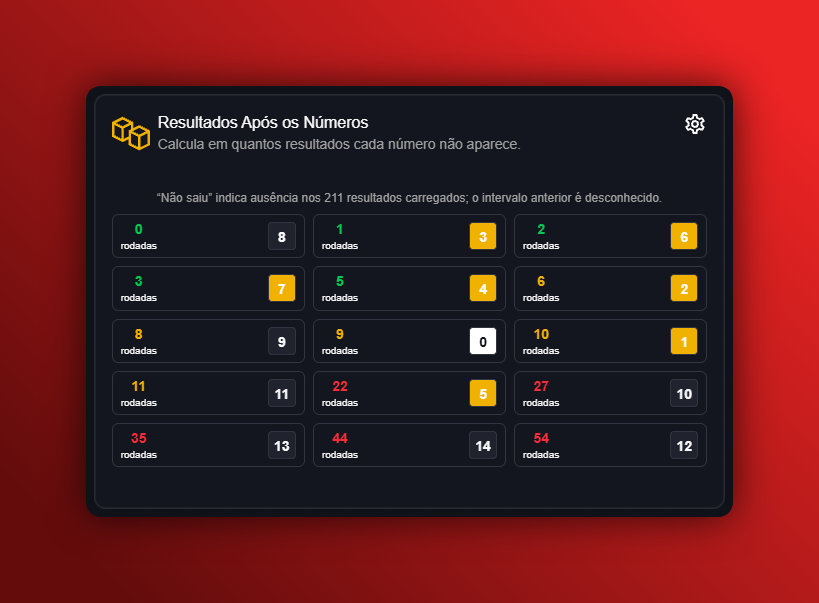
How the “results after numbers” widget works
What the widget is 🧾
The “results after numbers” widget is a Dashboard component that shows, for a selected game, how subsequent results behaved after specific numbers or patterns occurred. It combines two types of information:
- Server-queried statistics (general coverage stored in the database).
- Screen statistics — calculations made on the results currently loaded on the page.
The widget provides a historical view of what followed certain occurrences; it does not predict or guarantee future outcomes. ⚠️ Histories and frequencies describe the past, not guaranteed probabilities for the next round.
What the widget displays 🔎
Typical elements shown include:
- The observed event or pattern (e.g., number X appeared, or a sequence of numbers).
- How often that event occurred in the available history.
- The results that immediately followed each occurrence (as a list or aggregation).
- Coverage indicators: whether the numbers come from the server database or just the sample loaded on screen.
Fictional example: “After number 7 appeared, in the screen-loaded occurrences the next results were number 3 twice, number 9 once, and other numbers three times.” (fictional example)
Data sources and the difference between them 🛰️
- Server data: summaries and stats that can cover a larger and more complete period, depending on the coverage available for the game and platform.
- Screen data: calculations performed locally on the results you have loaded. These values change if you filter or load a different set of results.
Coverage depends on the game and platform. Not all games have complete histories; the widget indicates the source used for each statistic.
Limitations and interpretation cautions 📌
- Do not treat frequencies as guarantees of future events. The widget only shows past outcomes.
- If the sample is small (only the results loaded on screen), measures can change significantly when more data is loaded.
- Unequal coverage across games and platforms can bias comparisons.
- Do not promote or recommend betting to minors.
Practical uses (guidance, not a recommendation) 🧭
- Examine historical patterns following a specific event to study past recurrences.
- Filter by period or result type and compare server stats with screen stats to understand sample effects.
Fictional usage flow example: 1) select the game; 2) choose the pattern “number 12”; 3) review the list of results that followed each occurrence and the aggregated frequency. (fictional example)
Transparency and labeling 🪪
- The widget should clearly indicate whether it is showing server numbers or screen calculations.
- Look for labels that explain coverage and the analysis period.
Quick summary ✅
- The “results after numbers” widget shows historical outcomes that followed specific occurrences.
- It distinguishes server-provided statistics from calculations over the currently loaded screen data.
- Use it for historical analysis; it is not a tool for guaranteed prediction.
If you want, I can draft a short step-by-step guide with illustrative (fictional) screenshots showing where to find each piece of information on the Dashboard. 📊
