
How to read the color-proportion widget for the Double game
Understand what the Double game's color-proportion widget shows, how values are computed (server vs. screen), coverage limits and cautions when interpreting historical frequencies.
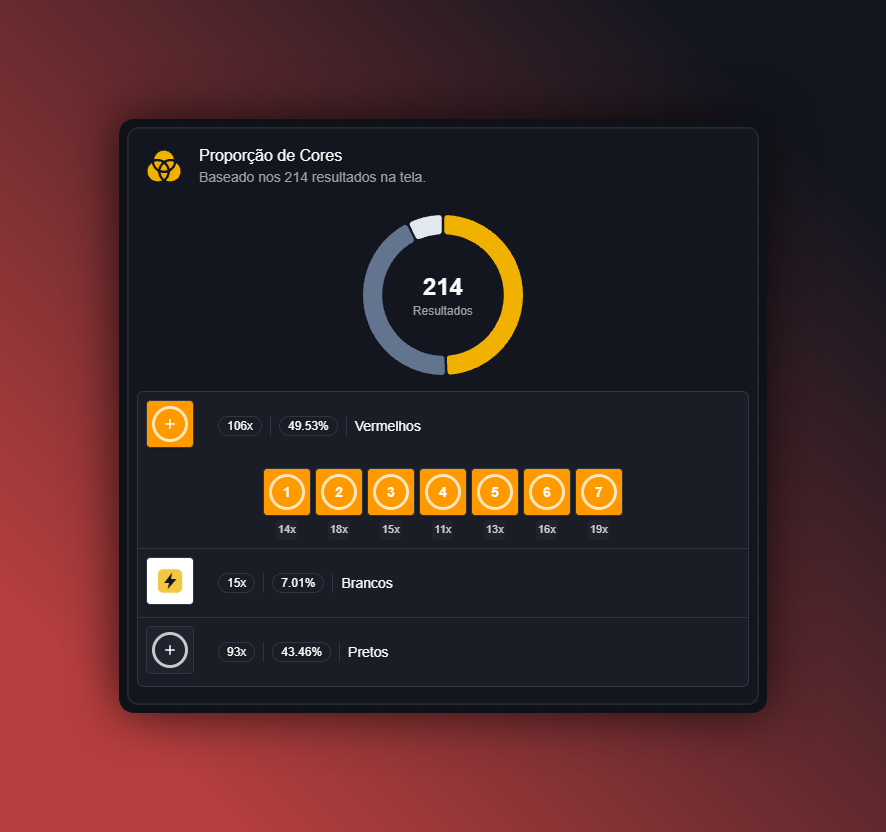
How to read the color-proportion widget for the Double game
This article explains what the color-proportion widget for the Double game displays, how the numbers are obtained, and what to watch out for when using that information. 🎯
What the widget displays
The color-proportion widget summarizes, using percentages or bars, each color's share (for example: color A, color B, etc.) among the loaded results for the Double game. It provides a quick visual of how results were distributed in the available history.
Data sources: server vs. screen
- Server-queried statistics: some metrics may come from server-side queries. Those queries typically aggregate more results and are subject to the time range and coverage configured on the dashboard.
- Screen-calculated statistics: other measures (especially those based on the subset currently loaded or filtered) are computed locally in the browser from the results you have on screen.
Note: the dashboard can mix both calculation types. The widget usually indicates which source is used; check the legend or help panel when available. 🔍
Coverage and time range
The widget's coverage — i.e., how many game rounds were considered — depends on the specific Double game and the platform (for example: history stored on server A or B). The displayed history does not always represent every round ever played.
Before interpreting proportions, check:
- the selected time range (last N rounds, specific dates, etc.);
- whether filters are applied (single table, specific bet type, etc.);
- whether the data comes from the server (larger/centralized sample) or only from the results currently loaded on your screen.
How percentages are calculated
Generally, the widget divides the number of occurrences of each color by the total considered results and converts to percentage. Example:
- If color A occurred 30 times and color B occurred 70 times in 100 results, proportions are 30% and 70%.
Fictitious example (for illustration only):
- Red: 42% (42 occurrences)
- Blue: 38% (38 occurrences)
- Green: 20% (20 occurrences)
Note: the numbers above are fictitious and only demonstrate how to read the widget. ⚠️
Limitations and cautions
- Frequencies describe the past and do not guarantee future results. The widget shows historical observations and trends, not certain probabilities for the next round.
- Small samples can distort perception. If the number of considered results is small, minor variations cause large percentage swings.
- Mixing calculation sources (server vs. screen) can create discrepancies between what different users see with different filters.
- Coverage depends on the game/platform: not all tables or Double versions have the same history available.
Best practices when using the widget
- Check the sample size before drawing conclusions.
- Use analysis filters and time ranges transparently: take note of which filters are active.
- Combine the widget's reading with other dashboard information (e.g., run-length displays, time-between-occurrences widgets) for context.
- Do not rely solely on a single metric; treat the widget as a historical visualization tool. 🧭
Important notices
- This widget displays historical data. It should not be interpreted as a guarantee of future outcomes.
- Do not recommend betting to minors.
- According to the service owner, the Blaze platform is paused in Brazil — this text does not assert any regulatory status beyond what the owner reported.
If you want, I can walk through a real example visible on your dashboard (identifying data source and sample size). Send the widget details you see and I will explain step by step. 💬
