Histories Blaze Analysis Lab
Result Replay: how to use the tool step by step
Practical guide to the Replay: how to load periods, control playback, use shortcuts and understand limits — including round limits, auto-pause behavior and credit consumption.
4 min read
What the Replay does
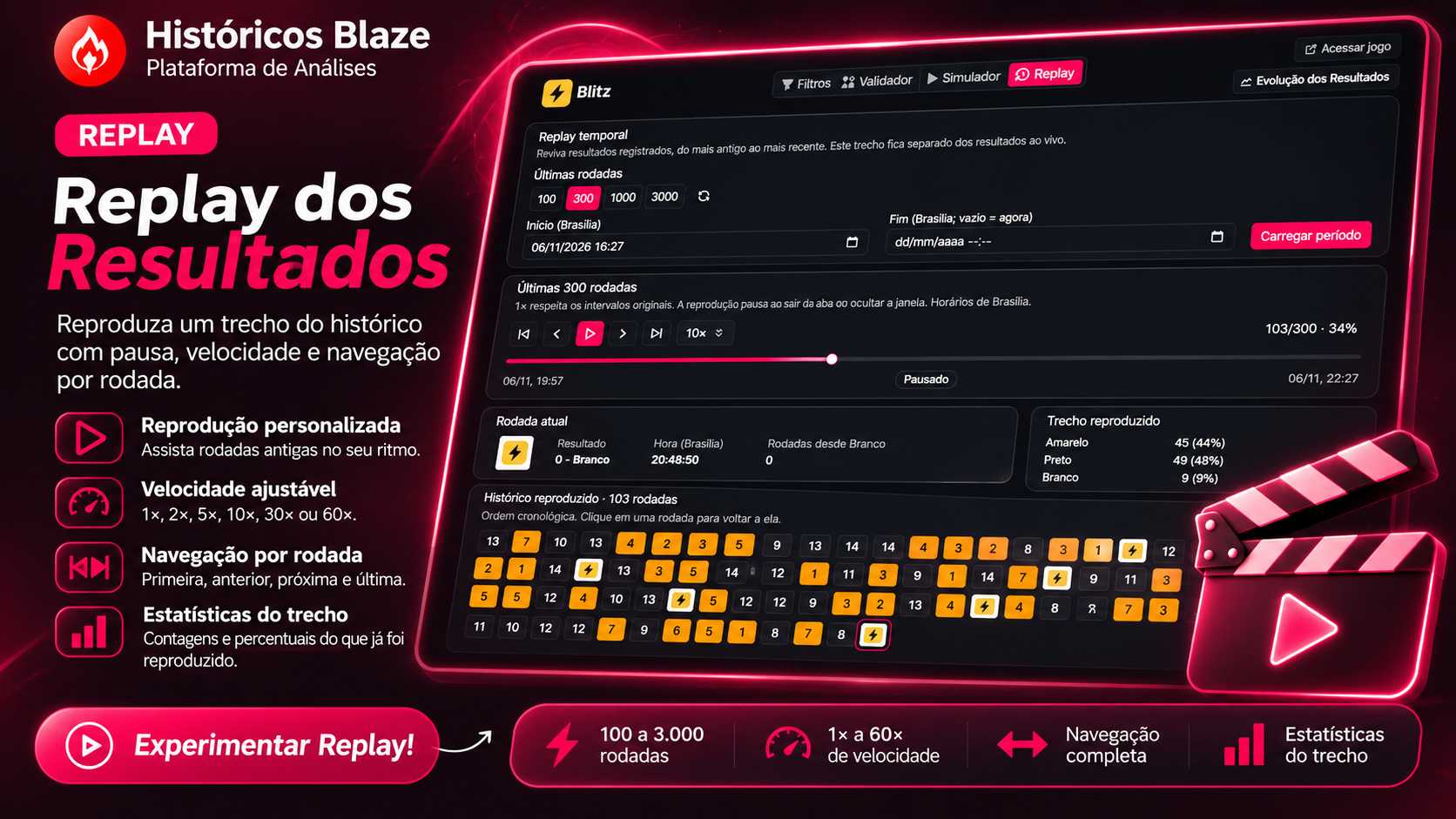
The Replay replays a copy of past game rounds for review and analysis. It does not receive new live rounds: it works on a loaded sample (up to 3,000 rounds). ✅
According to the owner, Blaze is paused in Brazil; this post treats Replay as a history and analysis tool, not a betting recommendation. Do not recommend betting to minors.
Access and billing
- Log into your account and open the "Replay" tab. The tool is free by default.
- If billing is active on your account, use the "See plans" button to purchase access with credits.
Load a period (step by step)
- Open the Replay tab in your account.
- On opening, the last 300 rounds are loaded automatically.
- You can choose to load 100, 300, 1,000 or 3,000 rounds.
- Alternatively, enter a start time and an end time in Brasília time and click "Load period." Leaving the end empty uses the moment you click as the end.
- Note: periods larger than the limit show the first 3,000 rounds and display a warning. The start time is inclusive; the end time is exclusive.
Playback controls
- Press "Play" and choose a speed: 1×, 2×, 5×, 10×, 30× or 60×.
- At 1×, the interval between rounds follows the recorded timestamps.
- "Pause" lets you stop and later continue from the same point; if playback reaches the period's end, pressing "Play" restarts the segment.
- Use the buttons to go to the first round, the last, the next or the previous round.
- Drag the timeline to jump to a specific point. When the timeline is selected, you can also use the keyboard arrows.
- Clicking a round in the history jumps directly to that round.
- Manual navigation (dragging, arrow keys or clicks) pauses playback automatically.
On-screen indicators and statistics
- Follow the current round and its timestamp.
- See counts and percentages for the portion already replayed. Future rounds in the loaded sample (those after the current point) are not included in these statistics.
- In "Rounds since", a dash indicates that the event has not yet appeared within the replayed segment.
- Numbers and results shown in screenshots are illustrative; they are not up-to-date statistics nor evidence of outcomes.
Shortcuts and quick searches
- The "previous" and "next" shortcuts can search for specific events per game, for example (fictional examples):
- white/Panda in Double/Fortune Double
- Ferrari in Car Roulette
- multipliers of at least 10× in Crash
- bonus in Crazy Time
- "Random position" jumps to a random round inside the loaded sample.
Behavior when switching tabs, leaving or losing access
- Switching browser tabs or hiding the window automatically pauses playback. Returning to the tab preserves the period and the current position.
- Switching platform or game, leaving the page, signing out, or losing access ends the Replay session.
- Reloading the segment requests the data from the server again for that period.
Limits, credit usage and saved position
- Replay uses a copy of up to 3,000 rounds and does not include new live rounds while replaying that segment.
- When access is billed, replaying or reloading the same segment does not consume additional credits (per the tool's stated rules).
- The position within a segment is not saved to your account: leaving and returning will not restore the previous position.
Quick tips
- Use 1× to preserve real intervals between rounds; increase speed to review faster.
- Pause before switching tabs to avoid losing your place.
- Load only the necessary period rather than 3,000 rounds for focused analysis.
Final notices ⚠️
- This content explains Replay as a history and analysis feature.
- There is no guarantee of winnings, outcome predictions, or safety in betting. Do not promote betting to minors.
- Do not assume features beyond those described; availability of platforms in a country was not independently verified beyond the owner's notice about Blaze.